What Is xAPI? How It Works, Benefits, and Real-World Uses
In our everyday lives, technology effortlessly tracks our behavior to understand what we care about. For instance, every time we pick up a smartphone, watch a video, or look up a tutorial, we leave a digital footprint. However, in training and education, many instructors are still stuck with rigid tracking tools that only record basic learning metrics.
This lack of detailed learning data has left about 71% of educators unable to demonstrate the actual impact of their programs. Changing this requires a fundamental shift in how we measure knowledge, which is exactly why the industry is moving toward xAPI (Experience API).
But what is xAPI exactly? And how can you, as an educator or trainer, use it to improve your learning courses? We’ll be covering all of these points, and more, in this article.

What Is xAPI?
xAPI (Experience API) is an elearning standard that makes it possible to record and share learning data across different virtual applications and platforms. Unlike older tracking standards that primarily focus on online courses, xAPI-compliant applications can record learning activities taking place in mobile apps, team collaborations, virtual reality simulators, and various training activities.
Rather than focusing only on course completion tracking, xAPI provides a broader view of how people learn. It acts like a universal translator, allowing different learning applications to describe learner activities in the same standardized format. Whether a learner completes an interactive ebook, watches a training video, finishes a simulation, or practises a real-world task, compatible systems can record those activities consistently and store them in a Learning Record Store (LRS). After that, educators and organisations can analyse this data to understand learner behaviour and training outcomes better.
What Types of Learning Data Can xAPI Record?
The short answer? Virtually any learning-related activity that an xAPI-enabled application or system is designed to record. Older standards like SCORM primarily tracked basic web-based course data such as whether or not someone finished a module, pass/fail status, and a final test score. xAPI expands this dramatically because it makes it possible to record learning activities across virtually any environment using simple statements in the format Actor–Verb–Object.
Every xAPI statement can also capture additional context (what device was used, location, instructor name) and results (scores, duration, success status). This gives you a much richer picture of how someone learns and performs over time.
Here is a breakdown of the main types of data xAPI can capture:
1. Detailed Course & Content Interactions
Instead of just recording “Course Completed,” xAPI captures what happens inside the content:
- Video engagement: Pausing, rewinding, fast-forwarding, or dropping off at a specific timestamp.
- Ebook reading: Chapters read, pages viewed, bookmarks saved, text highlighted, and notes taken (e.g., via authoring platforms like Kotobee).
- Quiz behaviors: Individual question responses, time spent on specific questions, answer attempts, and partial scores.
2. Interactive and Immersive Learning Data
Unlike older standards that primarily tracked browser-based online courses, xAPI can capture learning activities across a much wider range of digital environments, including:
- VR / AR Simulations: Equipment handled, sequence of actions taken, reaction speed, and spatial choices made during a virtual scenario.
- Serious Games and Apps: Levels completed, choices selected, paths taken, and achievements unlocked.
- Mobile and Offline Activity: Learning completed while offline (like reading a guide on a flight), which automatically syncs to your central system once reconnected.
3. Informal and Collaborative Learning
Learning sometimes happens outside formal online courses, and xAPI-enabled applications can record these experiences. For instance, it can record:
- Social & Community: Forum posts created, comments made, articles shared, or peers mentored.
- External Content: Watching instructional videos, reading articles, or attending webinars and podcasts.
4. Real-World Business Outcomes and Performance
Because xAPI is an open standard, business systems (like CRMs, HR platforms, and help desk software) can send performance metrics straight to the same central database (LRS) as your learning data. This makes it easy to compare learning results alongside actual outcomes, like:
- Sales metrics: Deals closed in Salesforce after completing a sales training module.
- Customer Support: Resolution times or satisfaction scores after taking a service course.
- Workplace Safety: Safety metrics, such as incident rates or compliance records, analyzed alongside training data.
How Does xAPI Work?
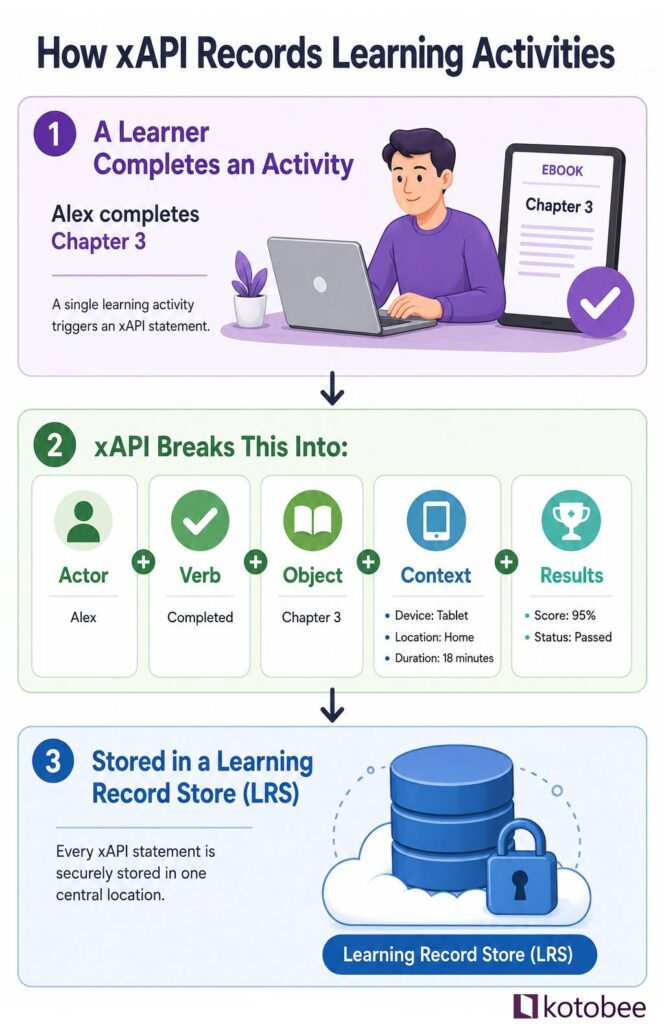
To understand how xAPI works, you don’t need to be a programmer. Think of it as creating a digital paper trail of simple, sentence-like records every time a learner interacts with something. Each record, called a statement, describes what happened using a format that’s easy for computers to process and share.
This process relies on three simple parts: the statement, the sender, and the storage.
1. The Statement (The Sentence)
The basic building block of xAPI is the statement. Every time a learning event happens, xAPI packages it into a simple, standardized sentence (AKA: Statement). This statement consists of:
- Actor (Who): The learner.
- Verb (Action): What they did.
- Object (What): The content or tool they used.
- Context & Details (Optional): Extra data attached to the event, such as quiz scores, completion times, devices used, or offline status.
To better understand what a Statement looks like, take a look at the following table:
| Actor (Who) | Verb (Action) | Object (What) | Context & Details (Advanced) |
| Sarah | Completed | The leadership simulator | Score: 92% • Duration: 14 mins |
| Marcus | Watched | The video tutorial | Device: iPhone • Timestamp: 10:42 AM |
| Elena | Read | The chemistry lab guide | Highlights: 3 notes • Offline mode |
2. The Sender (The App or Device)
An xAPI statement is created and sent by any tool or app set up to track learning. It could be a mobile quiz app, a virtual reality headset, an online website, or an interactive simulator. The moment a learner does something on this tool, the LRP packages that action into a statement and hits “send.”
3. The Storage (The Database)
Once sent, the statement lands in a Learning Record Store (LRS), which is the central database that receives, organizes, and stores all xAPI data. Think of it like your bank statement: every deposit, withdrawal, and payment is recorded in one place. Similarly, an LRS records every learning activity reported through xAPI. This database can run as a standalone system or live directly inside a traditional Learning Management System (LMS).
Learner Action (App/Device)⟶xAPI Statement (Sent)⟶LRS (Stored & Tracked)
xAPI vs SCORM
If you’ve been in the digital learning space for a while, you’ve almost certainly run into SCORM (Sharable Content Object Reference Model). It has been the industry standard for decades. At first glance, xAPI and SCORM seem to do the same job, but comparing them is a bit like comparing a landline phone to a smartphone.
While SCORM was built for an older era of desktop-based, browser-locked learning, xAPI was designed for the modern, multi-device world. SCORM is excellent at tracking simple completions, while xAPI tracks the actual experience of learning.
Here is how they stack up in a few key areas:
- Location: SCORM forces the learner to stay inside a web browser linked to an LMS. xAPI, on the other hand, can track learning anywhere: inside an LMS, on a mobile app, or inside a virtual reality headset.
- Data Depth: SCORM can tell you if someone finished a course, how long they took, and their final test score. xAPI can tell you how they behaved, including which video sections they rewound, where they hesitated in a simulation, and how they handled interactive scenarios.
- Connectivity: SCORM requires a constant internet connection to talk to the LMS. xAPI can track offline learning (like reading on a tablet during a flight or practicing on a remote simulator) and automatically sync the data when the user goes back online.
| Capability | SCORM | xAPI |
| Tracks completion, time, and pass/fail | ✓ | ✓ |
| Reports a single final score | ✓ | ✓ |
| Reports multiple scores & detailed test answers | ✗ | ✓ |
| Works without an LMS or web browser | ✗ | ✓ |
| Tracks offline & mobile app learning | ✗ | ✓ |
| Supports cross-device learning experiences | ✗ | ✓ |

Creating xAPI-Compatible Learning Experiences (Using Kotobee)
By now, you’ve seen how xAPI extends learning beyond the traditional LMS. It allows you to capture richer learning data and support personalized, data-driven training. The next step is choosing an authoring tool that makes it easy to put these capabilities into practice, and that’s where Kotobee comes in.
Kotobee Author allows you to create interactive ebooks and export them as xAPI-compatible learning content. Instead of just hoping your learners are reading the material, by using Kotobee Cloud or Kotobee Library, you’ll be able to track rich, contextual behaviors, including:
- Deep reading engagement: You can see exactly which chapters a user spends the most time on, which sections they highlight, and what notes they take.
- Interactive content: If you embed a self-assessment quiz or a video directly into the ebook page, Kotobee sends those specific interactions straight to your central database (LRS).
- Accessible mobile learning: Because Kotobee supports offline reading, a user can download a training guide to their tablet, read it on a flight with zero Wi-Fi, and once they reconnect, Kotobee automatically syncs their learning records using xAPI.


Final Thoughts
Adopting xAPI is much more than just a tech upgrade. It is a fundamental shift in how we understand and support modern learners. By tracking real learning behavior instead of basic metrics, xAPI gives you a full picture of true growth wherever it happens. You no longer have to guess if your training is making a difference because you finally have the real-time proof to show for it.
More from Our Blog