
EPUB vs PDF: Which Ebook Format Should You Choose?
If you’re stepping into the world of ebook publishing, one of the first choices you’ll face is deciding how to turn your manuscript into a digital book. Should you go with EPUB or PDF? This isn’t just a technical decision; in fact, it shapes how your book looks, how easy it is for readers to enjoy, and even where you can sell it.
Taking a deep look into EPUB vs. PDF allows you to make a choice that fits your content and your readers’ needs. That choice becomes much clearer once you understand what each format is best suited for, from how it appears on a phone or tablet to the reading experience it delivers. In this guide, we’ll break down the key differences between these two popular formats and help you decide which one will let your ebook shine.
What Are EPUB and PDF Formats, Exactly?
PDF, or Portable Document Format, is basically a snapshot of a page on your screen. It’s fixed and static. Just like a printed book, you can’t adjust the text, resize images, or make it flow differently on your device. That’s why PDFs are easy to share, but they aren’t very flexible.

EPUB, on the other hand, is short for Electronic Publication and was mainly created for digital reading. It’s flexible, reflowable, and adapts to any screen size. It also has many settings and customization options that allow you to change text size, switch to dark mode, or even interact with multimedia elements.
EPUB vs PDF: What Is the Difference?
Both the EPUB and PDF formats have their place in the digital world, but they work very differently. Each has unique strengths, and the right choice depends on how you want the reading experience to be for your users and how you plan to share and publish your content.
So let’s explore the key differences between EPUB and PDF and find out which format works best for your ebook.
1. Purpose
The first distinction to be made refers to the purpose for which PDFs and EPUBs were developed in the first place. PDFs are designed to preserve exact page layouts, similar to printed documents. It’s the same as holding a hardcopy book in your hands, but you’re reading it via a screen.
By contrast, EPUBs were developed specifically with tablets and smartphones in mind. That’s why creating a PDF of your manuscript won’t be the best idea if you’re actually looking to create a digital file that can easily be read on any device.
2. Reading Experience
Ever tried reading a PDF on your phone and ended up zooming, scrolling, and squinting just to get through a page? That’s the reality of PDFs. As we mentioned earlier, this format is essentially digital snapshots of printed pages: static, unchangeable, and exactly the same for every reader. While this preserves the ebook design perfectly, it can be frustrating on smaller screens. Having to zoom and scroll to read the text isn’t ideal for a smooth ebook experience.
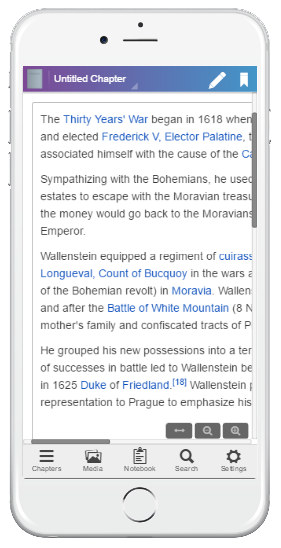
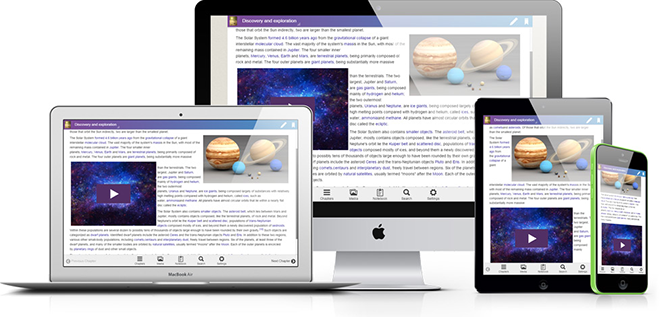
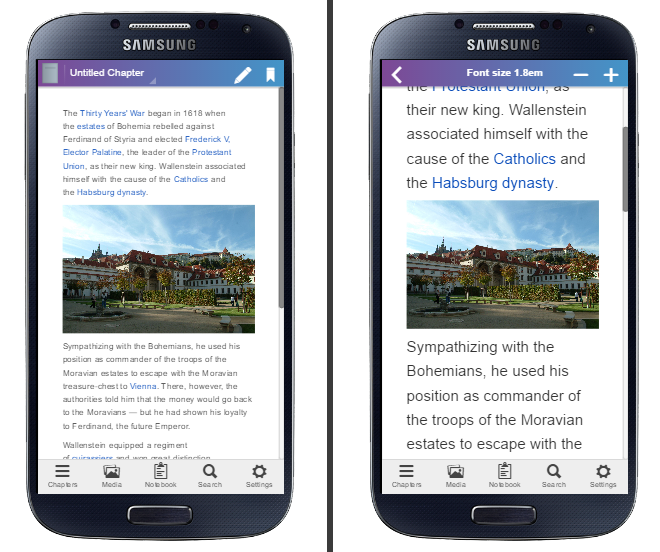
When it comes to EPUBs, you’ll find that they are much more flexible. Reflowable EPUBs, in particular, adjust text and images to fit any screen, from smartphones to tablets. The text flows naturally around images, and readers can resize fonts or switch to dark mode without breaking the layout.
Read: Best Ebook Layout Format: Reflowable or Fixed?
3. Compatibility with Ebook Readers
PDFs can be read on some ebook readers. But as mentioned previously, because PDFs use fixed layouts, they generally can’t be read on a small screen without a lot of scrolling and zooming. That’s why many major ebook retailers and distributors favor the EPUB format over PDFs.
So if you’re expecting your readers to own an ereading device such as a Kindle or a Nook (or to be reading your ebook via EPUB reader apps such as Kotobee Reader), publishing in EPUB is usually the better choice. That’s because EPUBs are designed specifically for digital reading, making them more compatible with ereaders (and easier to read).
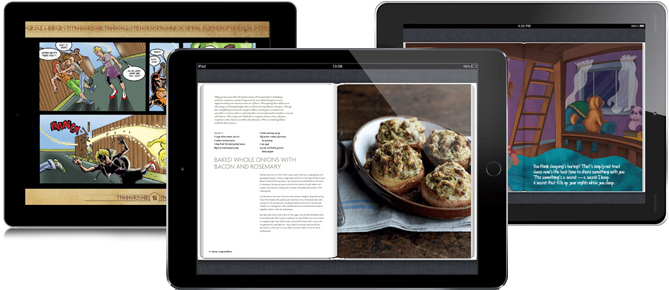
Besides that, EPUBs offer flexibility in layout. They can be created as fixed layout or reflowable files. Fixed-layout EPUBs lock text and images in place, similar to a printed page, while reflowable EPUBs adjust smoothly to different screen sizes. PDFs, on the other hand, are locked into a fixed layout and don’t adapt well to different screen sizes.
4. Interactivity
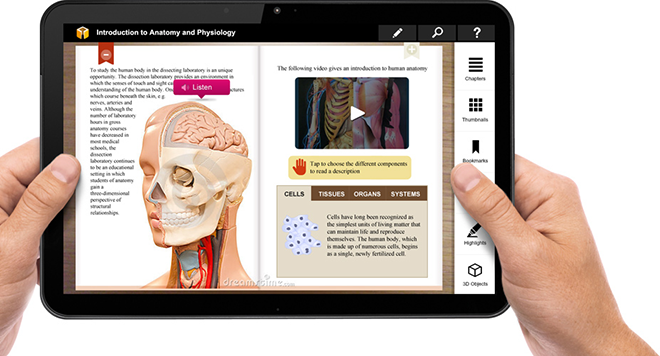
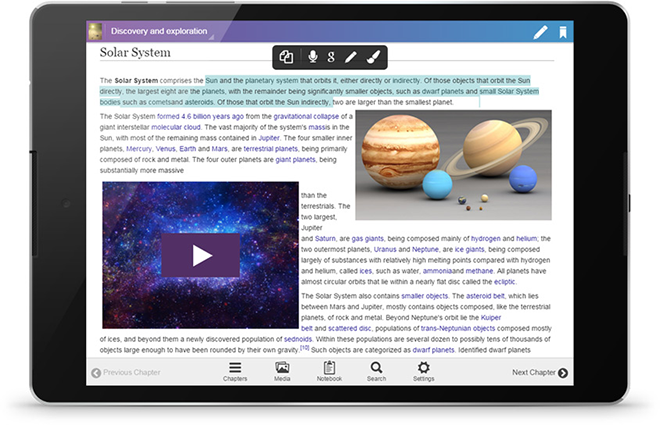
One of the biggest advantages EPUBs have over PDFs is their ability to be interactive. When using the EPUB format, you can embed videos, audio narration, animations, hyperlinks, ebook apps, and other interactive elements. This opens up a lot of creative possibilities for layout and design, while giving your audience a more engaging reading experience.
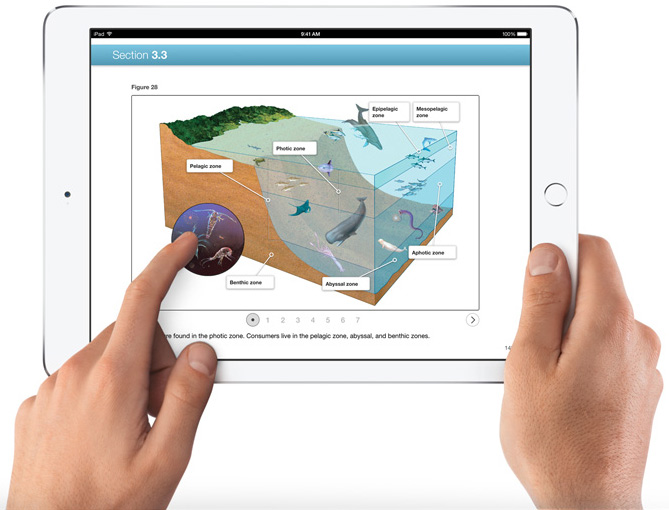
PDFs, on the other hand, are largely static. While it’s technically possible to add some interactive and multimedia features (such as links and images), doing so can create compatibility issues and significantly increase file size. For a smooth, media-rich, and device-friendly experience, EPUBs clearly have an edge here.
Important Read: How to Make an Interactive Ebook
5. Reaching a Broader Audience
If your goal is to make your ebooks accessible to as many readers as possible, then EPUB is the way to go. Visually impaired readers, for example, can benefit from features like audio narration and adjustable text, which make the content immediately more accessible. Additionally, reflowable EPUBs allow fonts to be resized, and the text and images automatically adjust to the screen, giving readers full control over their reading experience.
Another reason EPUBs help you reach a broader audience is that most major ebook retailers and distributors now require this format. By publishing in EPUB, your book becomes compatible with platforms like Kindle, Nook, Kotobee Books, Kobo, and Apple Books. This makes your ebook available to the widest possible audience.
PDFs are less flexible and generally don’t provide the same level of accessibility or platform compatibility. While they can still be shared, they don’t offer such ease of use or adaptability for different readers and devices.
Important read: Why and How to Optimize Your Ebook for All Readers
6. File Size and Performance
EPUBs are generally smaller and optimized for digital reading, which means they usually load quickly. Because EPUBs are designed to adapt content to different screens, text and media are not locked into fixed pages. Even when an ebook includes images, audio, or video, EPUB files are typically structured and optimized in a way that keeps them relatively lightweight. This makes the ebook files easy to download and smooth to navigate, even on older devices or slower internet connections.
PDFs, by contrast, are often larger, especially if they contain high-resolution images, embedded fonts, or complex layouts. Since PDFs preserve every design element exactly as it appears on the page, they tend to require more storage space and may take longer to open. On tablets or smartphones, larger PDFs can feel less responsive, with more scrolling and zooming needed to read comfortably.
7. Security
EPUBs give authors and publishers more control over how their ebooks are used and shared. Most ebook retailers support DRM (Digital Rights Management) for EPUB files, which helps prevent unauthorized copying or distribution. This means you can protect your work while still making it widely available to readers across platforms like Kindle, Nook, Kobo, or Apple Books.
It’s much easier to share PDFs without restrictions. While it’s possible to add password protection, it’s often less reliable. Even with protection, PDFs can still be copied or forwarded, and it’s difficult to fully control who accesses the content.
Important Read: Document Security: What It Is and Why You Need It
| EPUB | ||
| Purpose | Designed for digital reading on tablets, smartphones, and ereaders | Designed to replicate printed documents |
| Reading Experience | Reflowable text; adjusts to any screen size; text flows around images; supports font resizing and dark mode | Static; fixed layout; requires zooming and horizontal scrolling on small screens |
| Device Compatibility | Fully compatible with most major ereaders and apps (such as Kotobee Reader) | Can be opened on many devices, but small screens require scrolling and zooming |
| Interactivity | Supports multimedia (audio & video), animations, hyperlinks, and interactive elements | Mostly static; multimedia elements are possible but limited, can increase file size and cause compatibility issues |
| Accessibility | Supports audio narration, adjustable text, and reflowable layout | Limited accessibility options; text and layout are fixed |
| File Size & Performance | Typically smaller; optimized for faster loading; multimedia elements compressed efficiently | Often larger, especially with high-resolution images, fonts, and complex layouts; slower to load on devices |
| Security & DRM | Supports DRM; protects content while allowing authorized distribution | Easier to share without restrictions; password protection is less reliable, and content can still be copied |
| Flexibility & Updates | Easy to update and convert between fixed and reflowable layouts | Harder to update; converting to EPUB or other digital formats can be imperfect |
| Best Use | Modern ebooks, interactive content, accessibility-friendly publications | Print replicas, reports, forms, or ebooks where exact layout preservation is critical (such as comic books) |
Frequently Asked Questions (FAQ)
1. Can I convert a PDF into an EPUB?
Yes, it’s possible. Using ebook software like Kotobee Author can help with the conversion, but starting from your original manuscript is usually the best approach for a clean, well-formatted EPUB.
Important Read: How to Make an Epub File
2. Which format is better for interactive content?
When it comes to interactive content, EPUB is the clear winner. You can embed videos, audio, animations, hyperlinks, and other interactive elements, making the reading experience much more engaging. PDFs can support limited interactivity (such as hyperlinks), but it may cause compatibility or performance issues.
3. Can I print an EPUB?
EPUBs are primarily designed for digital reading, so printing isn’t their strong suit. If you need a print-ready version, a PDF is better for preserving the exact layout and design.
4. Why do major ebook retailers prefer EPUB?
EPUB is optimized for digital devices, supports interactivity, and allows for a consistent reading experience across platforms. That’s why most retailers now require EPUB to ensure readers get the best experience possible.
5. Do EPUB files load faster than PDFs?
Yes. EPUBs are typically smaller and optimized for digital reading, which means they open quickly and are smoother to navigate, even on older devices or slower connections. PDFs can be large, especially with high-resolution images, and may load more slowly.
6. Which format is better for self-publishing?
EPUB is generally the best choice for self-publishing, especially if your goal is wide distribution, interactivity, accessibility, and device compatibility. PDFs are better suited for print-ready files or documents that need a fixed layout.
7. Which format offers a more enjoyable reading experience?
When it comes to keeping readers engaged and making content easy to use, interactive EPUBs have a clear advantage over static PDFs. For example, a famous Mexican magazine called IDC Online converted its publications into interactive digital magazines with features like text‑to‑speech, note‑taking, highlighting, and translations. After making this switch, they saw a 60 % increase in people actually reading their content!
Final Thoughts
When it comes to PDF vs EPUB, the choice can shape how your readers enjoy your ebook. EPUB offers flexibility, interactivity, and accessibility that make reading a pleasure on any device, while PDFs shine when exact layouts matter. Knowing the strengths of each format means you can pick the one that truly fits your content, and gives your readers the experience they’ll love. So, choose wisely, and let your ebook shine in the format that works best for both you and your audience.
.
You might also like:
How to Create an Interactive Ebook: A Step-by-Step Guide
Best Ways to Engage Readers Inside Your Ebook
Ebook Formats Explained for Beginners
How to Edit EPUB Books Manually
More from Our Blog








manxman1
May 11, 2019Err… PDFs have had ability to include multimedia for many years such as video and flash animations.
EPUB can’t even have headers and footers (according to programs I use).
Kotobee
May 12, 2019Thank you for your comment and insight. It’s true that media can be added to PDFs; however, it’s generally not recommended due to the large file size and compatibility issues.
Thanks to your comment, as a result, we’ll be clarifying the capabilities/limitations of interactivety in PDFs.
As for headers and footers in EPUBs, it is possible in fixed layouts, and like you said it does depend on your authoring tool. Kotobee Author users add headers and footers with a CSS code snippet. If you’re interested, our support team will gladly guide you through the steps.
Kotobee
May 12, 2019Thank you for your comment and insight. It’s true that media can be added to PDFs; however, it’s generally not recommended due to the large file size and compatibility issues.
As for headers and footers in EPUBS, it is possible in fixed layouts, and like you said it does depend on your authoring tool. Kotobee Author users add headers and footers with a CSS code snippet. If you’re interested, our support team will gladly guide you through the steps.
Again, thank you for your comment. As a result, we’ll be clarifying the capabilities and limitations of interactivety in PDFs.
flowney
June 20, 2019Agreed that EPUB is the more flexible format but there is a disconnect between some EPUB documents and some EPUB readers. The more authors diverge from EPUB 2 (toward EPUB 3), the more failures and some of those failures are not even silent as per W3C principles. BISG (Book Industry Study Group) used to try to keep up with this but I am unable to find the matrix that BISG used to maintain.