
Ebook Copyright Page: How and Why to Make It (With Templates & Examples)
Writing a book isn’t an easy task; it takes a lot of blood and sweat to get your manuscript perfected and then published. Naturally, you don’t want anyone to simply steal your work or attribute it to themselves, and that is where copyrighting your book comes in.
One way of protecting your book is to include a copyright page. This is true for ebooks as it is with printed books. So if you are wondering how to make a copyright page for an ebook, keep reading this article to find out.
What Is a Copyright Page?
Simply put, a copyright page is a page that lets people know your ebook shouldn’t be treated as a public domain. It’s your way of telling people: I wrote this book and all rights are reserved. It also carries important information about the book and its publication.
While this page might not add much value to the regular reader, it is going to protect your ebook from plagiarism. So if anyone did copy the content of your book without permission, you can easily sue them in a court of law.
Moreover, the copyright page provides technical information about your ebook. This could be helpful for librarians, booksellers, distributors, and retailers.
Do Ebooks Need a Copyright Page?
Ebooks need a copyright page just as printed books do, if not more! Due to their digital nature and availability online, ebooks are more vulnerable to piracy and plagiarism. This is mainly because it’s much easier to copy and paste from electronic sources than from printed content.
Where to Place a Copyright Page in an Ebook?
Copyright pages usually come at the back of the title page in printed books. In ebooks, however, it goes right after the title page. Some people argue that it should come at the very beginning of the ebook, even before the title page. Others prefer to place it after the title and acknowledgment pages. All these options are viable; just make sure not to place it after the table of contents.
What to Include in an Ebook Copyright Page?
When it comes to the copyright page for ebooks, there are certain elements that need to be included on it (so it would be legally legit), while others are optional. Now let’s take a look at these elements, and then discuss each of them in detail.
- Copyright notice
- Rights reserved notice
- ISBN
- Disclaimers
- Permissions notice
- Credits
- Publisher information
Copyright Notice (Required)
Think of the copyright notice as a declaration of ownership. You are letting others know that you created this ebook and that it belongs to you and only you. That is why the copyright notice is a must in the copyright page, and here is what it consists of;
- The word “Copyright” or the symbol “©”, but since not all countries recognize this symbol, it’s better to write the word or include both.
- The name of the copyright holder, which is usually the name or pen name of the author in the case of self-published ebooks.
- The year of publication of this ebook.
Here’s an example of what the copyright notice looks like:
Copyright ©, Jane Smith, 2026
Rights Reserved Notice (Required)
This is another element that must be included on the copyright page. It is also a statement that declares your ownership of the ebook and preserves your right to publish, distribute, and financially benefit from it.
This notice can be as short as “All Rights Reserved,” or it can be more elaborate, explaining and reinforcing the exclusivity of all rights. Technically, if you add the copyright and rights reserved notices, your copyright page is complete.
For example, the “Rights Reserved Notice” could look something like this:
All rights reserved. No parts of this book may be reproduced without the written permission of the publisher. For more information, contact the publisher at author@kotobee.com.
ISBN
The ISBN (International Standard Book Number) doesn’t exactly have a legal purpose, but it helps identify your ebook; that’s why it is included on the copyright page. And while not all self-published ebooks have an ISBN, it’s better for yours to have it, especially if you’re planning on selling it through different book retailers.
With that being said, not all publishing platforms require an ISBN. However, if you decide you want your ebook to have one, you can purchase it through the International ISBN Agency website.
Disclaimers
This is the part that protects you from other people’s claims and/or lawsuits. It’s where you deny responsibility for certain parts of your book. For example, if your book is a novel, you might want to deny that the characters are based on actual people. Or if it’s a memoir, you can state that all names have been altered to protect people’s privacy.
Here’s an example of a disclaimer in a novel:
All events and characters in this book are completely fictional. Any resemblance to actual people is entirely coincidental.
Permission Notice
Permission notices are close to the disclaimer notice. In case you used any copyrighted material in your book, you need to indicate that you’ve done this with the owner’s permission. When you’re writing a biography, for example, you can indicate that certain parts of the book were added with the permission of the person the book is about.
If you’re publishing a book that has lots of images (which you didn’t shoot yourself), you might want to include a permission notice like this one:
All copyright holders of pictures included in this book have been contacted and permissions were granted to use this material.
Credits
In this section of the copyright page, you can give credit to anyone who has contributed to the creation and content of your ebook. The credits could be to the graphic designer who designed the cover of your ebook, the proofreaders or editors who worked on perfecting it, or any service you used to bring this ebook to life.
The credits could be something like this:
Cover design by Kotobee Desing Services
Edited by Jane Smith
Publisher’s Information
If you are self-publishing your ebook, then you can use this part of the copyright page to promote ways your readers can connect with you. Remember that you’re still the publisher of your ebook even when you’re using a self-publishing platform such as Kindle or Apple Books. In this section, you can include your:
- Name or pen name
- Website
- Phone number (optional)
Ebook Copyright Page Examples
There are tons of copyright page templates and examples out there, but they are more for printed books than ebooks. This could be confusing as the copyright page of printed books contains elements that aren’t applicable to ebooks (such as the print number or the ordering information).
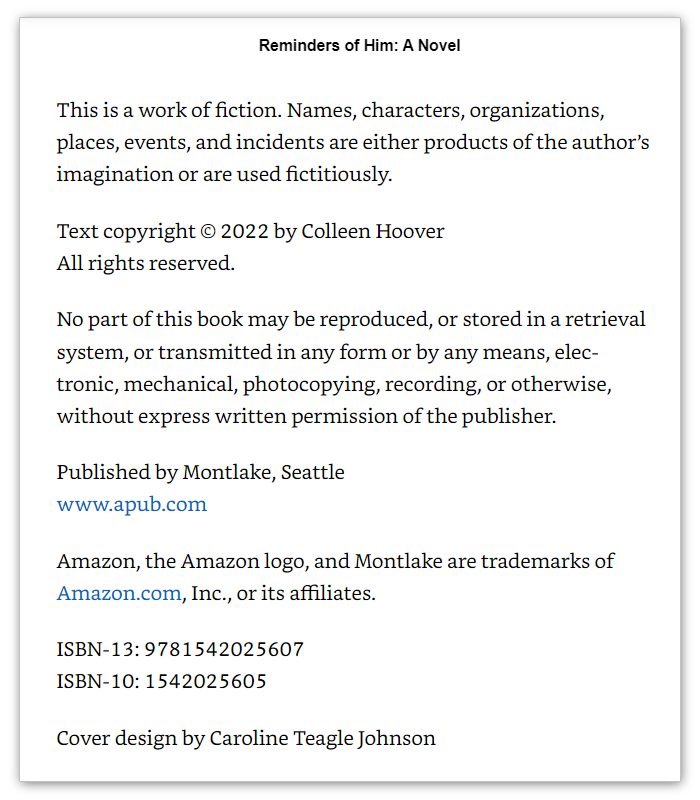
So to make things clearer for you, here are some examples of ebook copyright pages. The first one is from Colleen Hoover’s novel, Reminders of Him:
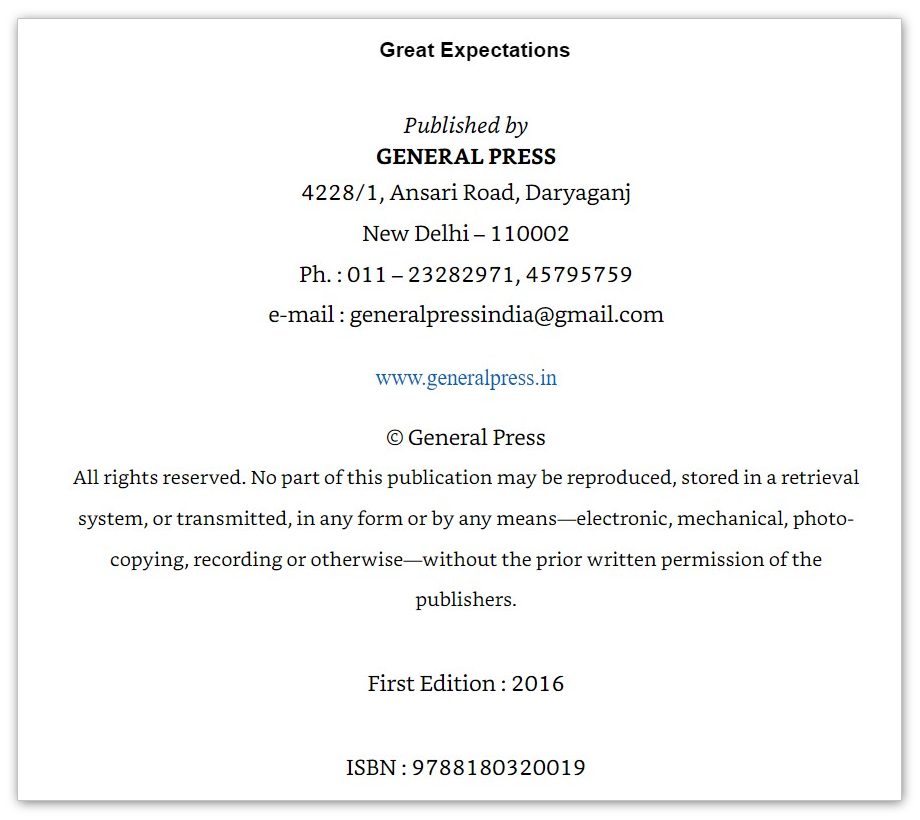
This example is from Charles Dickens’s Great Expectations ebook:
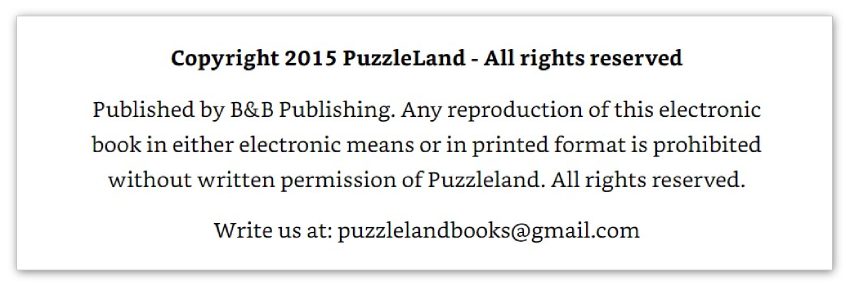
Another simpler example is from the book 30 Interactive Brainteasers to Warm Your Brain.
Ebook Copyright Page Templates
If you are looking for an ebook copyright page template for your self-published book that you can just copy and paste, check the templates below and feel free to use and edit them as you see fit.
Here is a simple, basic template:
Copyright ©, [Your Real or Pen Name], [Year of Publication]
All rights reserved.
This is another template that can be used for fiction books, and you can download it from the link below:
Frequently Asked Questions About Ebook Copyright Pages
Do I need a lawyer to create a copyright page?
No, you don’t need legal assistance to write a standard copyright page. Most authors handle it themselves using the common elements mentioned in this article. However, if your book involves sensitive material (like brand names, real people, or licensed content), it’s wise to get a professional opinion.
Will book retailers reject my ebook if it doesn’t have a copyright page?
Not usually. Most platforms don’t require it, but including one makes your ebook look professional and protects your rights. Skipping it might not block your upload, but it does leave your ebook more vulnerable to misuse, plagiarism, or unauthorized copying.
Can I add a Creative Commons license instead of “All Rights Reserved”?
Yes. If you’d like readers to share or adapt your work under certain conditions, you can state a Creative Commons license instead. Just be very clear about what permissions you’re granting.
Is it okay to reuse the same copyright page for all my books?
You can reuse the structure, but don’t copy it word-for-word. Make sure to update the year, title, ISBN, and any credits or disclaimers unique to each book.
What if I publish updates or new editions of my ebook?
Every new edition should reflect the correct year of publication and version information. This signals to readers (and stores) that they’re looking at the most recent release.
Do I need a copyright page for every format (paperback, Epub, PDF)?
Yes, it’s good practice to include or adapt a copyright page for each format you publish. Each version may have unique ISBNs, credits, or disclaimers, so reuse the structure but update details accordingly.
Can my ebook have a copyright page without registering the copyright?
Absolutely. Your work is protected under copyright law the moment it’s fixed in a tangible form. Registration helps strengthen your legal position, but you don’t need it in order to publish a copyright page.
What’s the difference between a print and an ebook copyright page?
Print versions sometimes include extra details such as printer location or cataloging data. Ebook copyright pages are simpler, focusing on rights, ISBNs, disclaimers, and credits.
Can I include a statement that forbids AI from using my ebook?
Yes. Some authors now add a line on their copyright page saying their book may not be copied, reproduced, or used to train artificial intelligence tools. While the legal weight of such a notice is still evolving, it clearly communicates your position to readers and platforms.
If I use AI to help write my ebook, do I still hold the copyright?
Generally, you hold copyright over the parts you wrote or directed. Some authors add a short note (e.g., “This work was created with the assistance of AI tools”) for transparency, but it’s not required.
Final Thoughts
Even though the copyright page might look simple and most readers often overlook it, it is critical that you include it in your ebook to protect its content and avoid any future legal issues. And if you’re still not sure how to write a copyright page for your self-published ebook, you can use Kotobee services to help you create, design, and publish your ebook.
.
Read More
The Art of Crafting a Table of Contents in Ebooks
9 Ebook Cover Tips for Beginners
10 Tips to Write a Book Blurb That Sells
More from Our Blog







Deb Wright
November 17, 2023I wrote a children’s book in 2022, and my publisher wrote in addition to the copyright:
“Published in the U.S.A.
D.R.R. Digital Rights Reserved”
Is this necessary?
Kotobee
December 27, 2023Hello Deb!
The inclusion of “Digital Rights Reserved” on the copyright page is not a standard or required practice, but it’s not uncommon for publishers to include it as an additional statement. “Digital Rights Reserved” typically means that the publisher is asserting control over the digital distribution rights of the work.
Whether it’s necessary depends on the agreement between the author and the publisher. In some cases, publishers may want to emphasize their control over the digital distribution of the book to prevent unauthorized digital reproduction or distribution.
If you, as the author, have any concerns or questions about this addition, it’s advisable to discuss it with your publisher. Make sure you understand the terms of the agreement and the implications of “Digital Rights Reserved” in the context of your specific publishing arrangement.
Additionally, consulting with a legal professional specializing in intellectual property or publishing law could provide more specific advice tailored to your situation.
Eli colgram
June 22, 2025I wrote a book before the year 2000 and had it copyrighted . I searched for my ISBN and my numbers were assigned to another book that came out in 2015
Kotobee
August 21, 2025Hi Eli!
That does sound frustrating! I’d feel really upset if I saw my ISBN linked to someone else’s book. While each ISBN is supposed to stay unique, sometimes mix-ups happen, especially with older records.
First, I’d recommend checking the original ISBN registration to confirm it’s legally registered to your book. If everything looks correct there, it might just be a cataloging error on a database or platform.
Your best bet is to reach out to the ISBN agency or platform support where you found the mismatch. They can look into it and help correct the metadata. If it turns out this ISBN has truly been reassigned, you might need to register a new one to avoid future confusion.
Best of luck!